Tax Return and Tax Refund Status
The IRS Where's My Refund? tool provides the tax refund status for the latest 3 tax years.
IRS Where's My Refund? Tool
- Once you have e-filed your return, your tax return status will change to eFiled. Your return(s) will either be Accepted or Rejected by the IRS/State Tax Agency.
- Sign in to your eFile.com account. After sign in you will see the page view below with either the e-filed, Accepted or Rejected filing status.
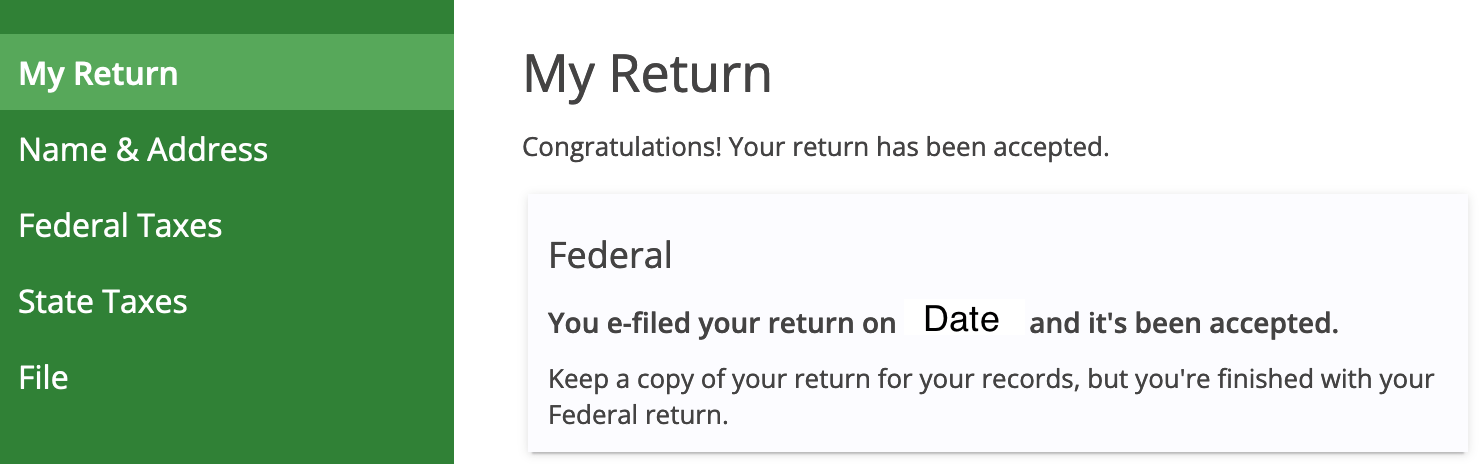
- Only the IRS or State reject returns, not eFile.com. If your return was rejected, it's most likely due to a technical issue, such as a previous year AGI amount miss-match, duplicate return e-filed, or other rejection reason. Most of the rejections can easily be corrected and then re-efiled for acceptance - contact us for help./li>
- Once your return(s) are either accepeted or rejected by the IRS and/or State, follow the steps below to find out where you tax refund is. To find out where your refund is, refer to the questions below to be sure your IRS and applicable state income tax returns were e-filed and accepted.
Already filed and know you were accepted? Check your tax refund status now:
IRS Refund Status Tool | State Tax Refund Status Tool
How to Check My Return, Refund Status?
Below are questions to help you find the resource you need - select the needed prompt to get answers about your IRS and/or state income tax return status.
Frequently Asked Questions
How do I know if my return was filed correctly?
How do I check my tax return status in my eFile account?
Sign in to your existing eFile.com account and you will see the status of your return:
- Not e-filed | In Progress
- Pending
- Accepted
- Rejected.
If your return was rejected, you can generally correct any errors and e-file again until your return is accepted. In case of an IRS rejection - not by eFile.com - we will provide you detailed instructions on how to correct your return. The rejection reason is stated and you will be given details as well as a link to fix the issue. For specific assistance, contact eFile.com support so we can guide you through the required corrections.
Note: you can only check your tax return status on eFile.com if you file it with us this year. If you e-filed your tax return on a different site, sign in to your account on that site; eFile.com cannot provide tax return status information for other websites or tax offices.
Where do I find my IRS tax refund status?
Your tax refund status can be found on irs.gov. Make sure you have a copy of your tax return handy which eFilers can find under My Account as you will need to provide the following information from your tax return:
- Your Social Security Number (SSN) or Individual Taxpayer Identification Number (ITIN)
- The tax year you are looking up
- Your filing status on that return
- The exact whole dollar amount of that year's refund.
Attention: You might see the following message after you have entered your details which means the IRS is verifying your personal identity:
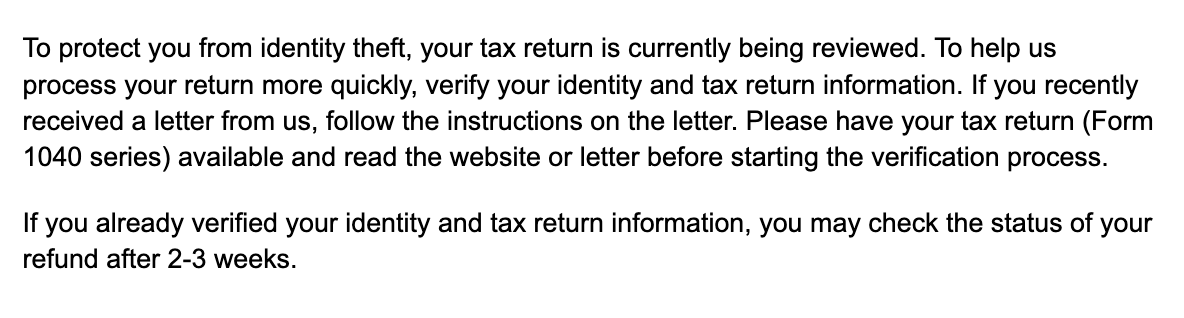
Visit the Where's my refund? lookup tool for a daily status update. If you have further IRS questions about the status of your return, you can also call the IRS Tax Assistance Hotline: 1-800-829-1040 Monday through Friday from 7:00 a.m. to 7:00 p.m. local time.
What does the IRS refund status page look like?
The IRS website will ask you for a few pieces of information: your Social Security Number, the tax year for which are you looking for a status of, your filing status, and your refund amount.
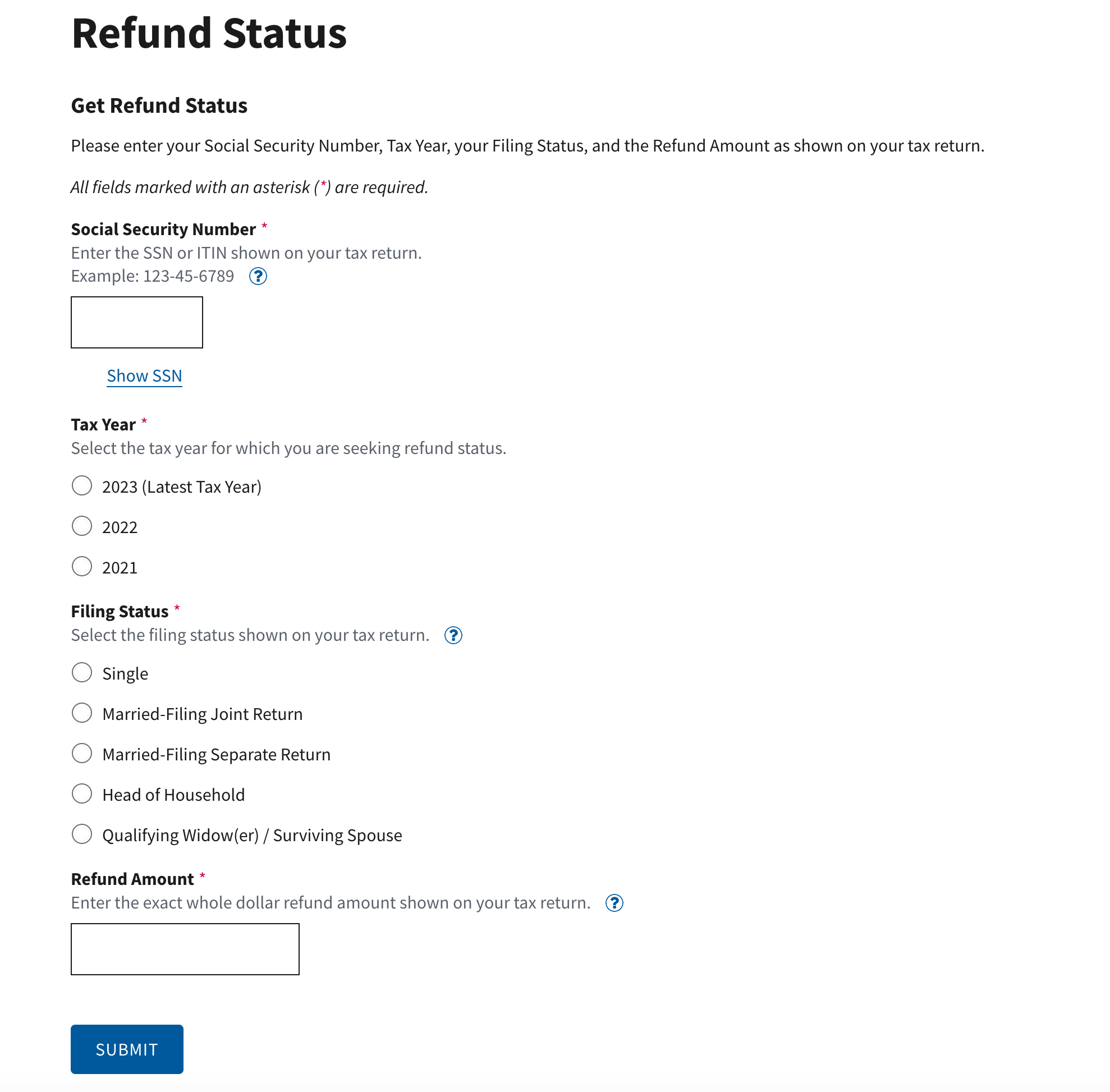
Verify that you are on irs.gov by looking at the website address in your Internet browser. Be sure that you are only entering this information on the IRS Where's My Refund? tool on irs.gov.
What does "received" mean? Why is my refund being processed?
Your tax return generally goes through three steps as shown in the screenshot below: Return received, refund approved, and refund sent.
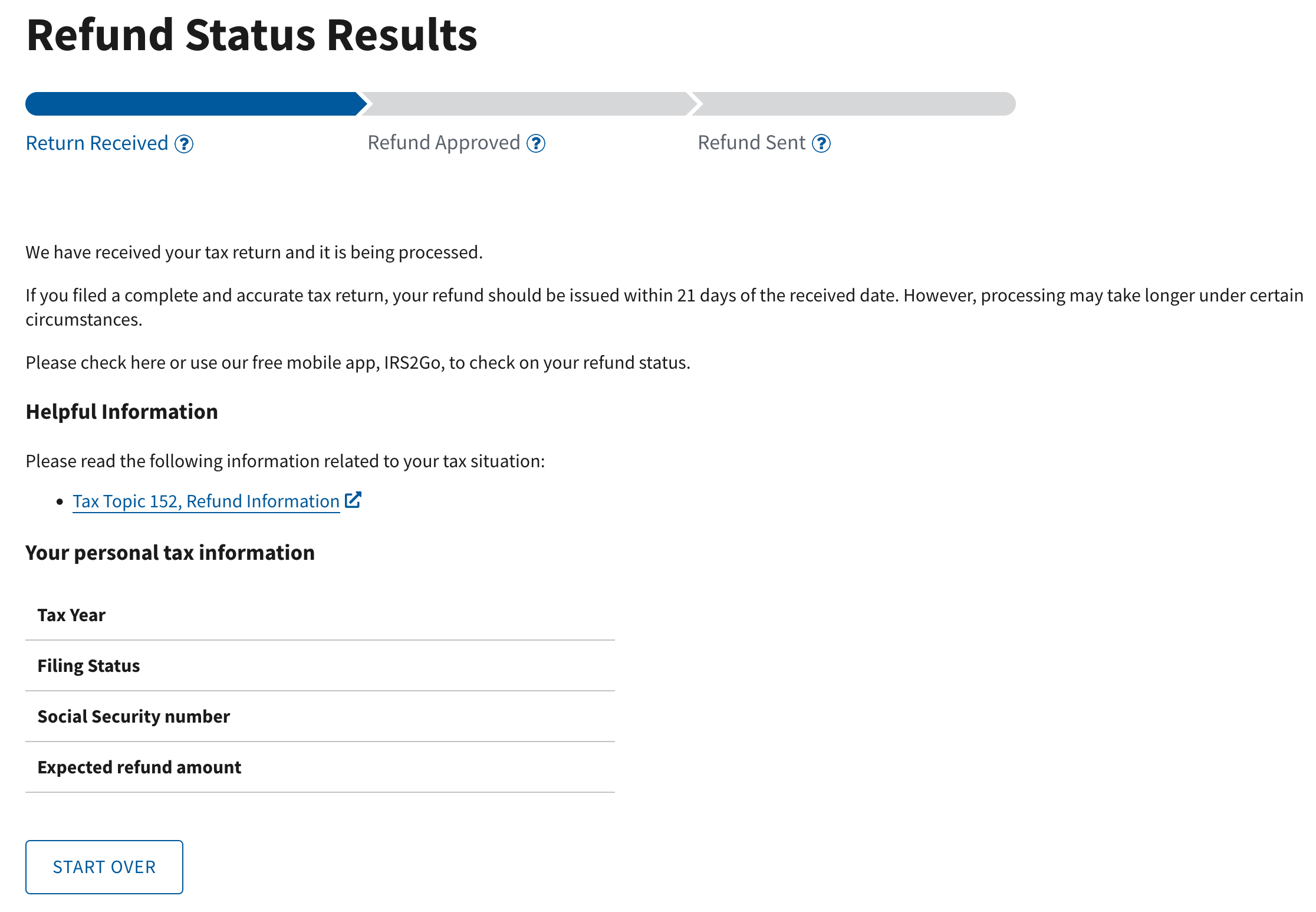
Your status will show "received" once your return has been e-filed and accepted or mailed in and received. In most cases, it then moves to "approved," but it may stay under "received" and show that it is processing for a long time.
The IRS may review your return longer than usual if you have a high refund often due to claiming the Child Tax Credit, the Earned Income Credit, or other large tax credit.
Once your refund is approved, it will move on to "sent" where the page will display information about where and how your refund was sent (direct deposit or check in the mail).
Why is my refund taking so long?
If the IRS delays your tax refund, view this tax return road map for a better understanding of which steps a tax return might go through. If your refund is delayed, there is generally no need to panic as millions of taxpayers are affected by delays each year and it does not necessarily mean there is anything wrong with your return.
There is nothing needed of you to expedite this process unless the IRS sends you a letter requesting additional information.
What is the fastest way to get a tax refund?
To get your refund as quickly as possible, file it electronically online and select direct deposit for your refund. When you e-file, you get nearly immediate confirmation of your return's acceptance and the IRS can send a refund via direct bank deposit much quicker than mailing a check or other method.
How long are tax refunds taking to be sent?
The IRS states that the majority of tax refunds are sent within 21 calendar days with most being between 7-14. Each year, they hold onto several refunds for review, especially those which are claiming refundable tax credits and thus have a large refund amount.
There are many things that can affect the processing rate of refunds by the IRS and each year there are delays. As long as your return is showing "accepted" and you can get a status on the IRS refund tool, then you can be sure that they have it and are working on it.
Did you know the IRS pays interest to you on a late refund?
How do I track my state tax refund?
To get the status of one more state income tax refunds, use our free refund status tool for all states. The tool will link you to the state needed where you can enter your refund information and get a status directly from the state tax agency.
Where does my refund go if I used e-collect?
If you used the e-collect method of payment during the filing process, your refund is sent from the IRS to EPS or Pathward Bank, our partner bank for deducting your fee from your refund. Once the IRS and/or state(s) send your refund(s), you can track it here: check the e-collect refund status .
The turnaround time is generally 1-2 business days once the bank has it. If there is any issue with direct deposit, they will have to mail you a check - these updates are available via the link.
File your taxes online each year to avoid mistakes and delays; e-filing is safe, simple, and makes the process much easier than filling in complicated tax forms and mailing them in.
TurboTax® is a registered trademark of Intuit, Inc.
H&R Block® is a registered trademark of HRB Innovations, Inc.